Introduction: In this article you’ll see how to Create dynamic Mega Menu in asp.net .Having a menu and sub menus with links is very normal in a Web application. Typically, we create static menu and menu items. But sometimes we need dynamic mega menu when we do not know what the menu names and links will be called. Mega menus are a growing trend in web design . For sites that involve a lot of pages and/or products, a mega menu may be able to improve navigation and usability. Dynamic Mega Menu with ASP.NET, C#, jQuery and SQL Server solution that I would like to share with others puzzled with the same as was one of my website development i was having a tough time creating a Mega menu from database. Step1 Database: I have 4 table category,subcategory subcategory2 and Brand GO /****** Object: Table [dbo].[tbl_Category] Script Date: 07/30/2015 08:03:43 ******/ SET ANSI_NULLS ON GO SET QUOTED_IDENTIFIER ON ...
In this short article I will explain how to export content in a div to a PDF using ITextSharp in ASP.Net. Step1: ITextSharp is a free and open source assembly that helps to convert page output or HTML content in a PDF file.Download it first from given link and add dll file in bin folder- https://sourceforge.net/projects/itextsharp/files/itextsharp/ Step2 -add Page <%@ Page Language="C#" AutoEventWireup="true" CodeFile="Studentdetails.aspx.cs" Inherits="Studentdetails" EnableEventValidation = "false" %> <!DOCTYPE html PUBLIC "-//W3C//DTD XHTML 1.0 Transitional//EN" "http://www.w3.org/TR/xhtml1/DTD/xhtml1-transitional.dtd"> <html xmlns="http://www.w3.org/1999/xhtml"> <head runat="server"> <title></title> </head> <body> <form id="form1" runat="server"> <div id="studentdetails" runat=...
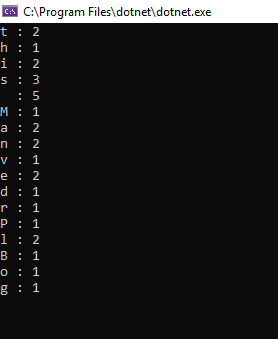
In this article, I will show, how to make a program which checks and count occurrences characters in a string in c# using System; using System.Collections; using System.Collections.Generic; using System.Linq.Expressions; namespace testconsole { class Program { static void Main(string[] args) { string input = "this is Manvendrs Patel Blog "; string chekvalue = ""; for (int i = 0; i < input.Length; i++) { if (chekvalue.Contains(input[i].ToString())) { } else { ...


Comments
Post a Comment